
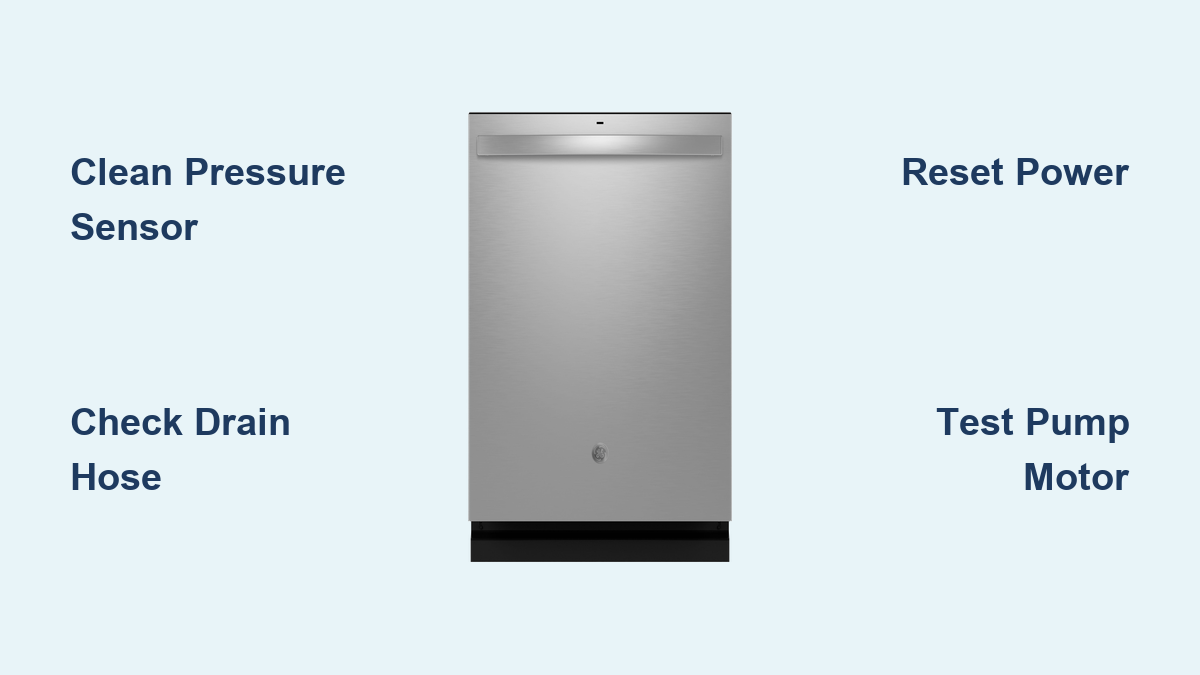
GE Dishwasher Error Codes Explained | Fix Common Issues
Your GE dishwasher suddenly stops mid-cycle, flashes a strange code, and won’t restart. You are not alone. Thousands of homeowners face GE dishwasher error codes like FED, FTD, C1, or F16 every year. These cryptic messages can be frustrating, but most are fixable in under 30 minutes with basic tools and the right guidance. This guide decodes every major GE and GE Profile dishwasher error, explains what is really wrong, and gives you step-by-step solutions.
From simple filter cleaning to diagnosing control board failures, you will learn how to troubleshoot like a pro and get your appliance running again without calling a technician.
Decode Drain Error Codes
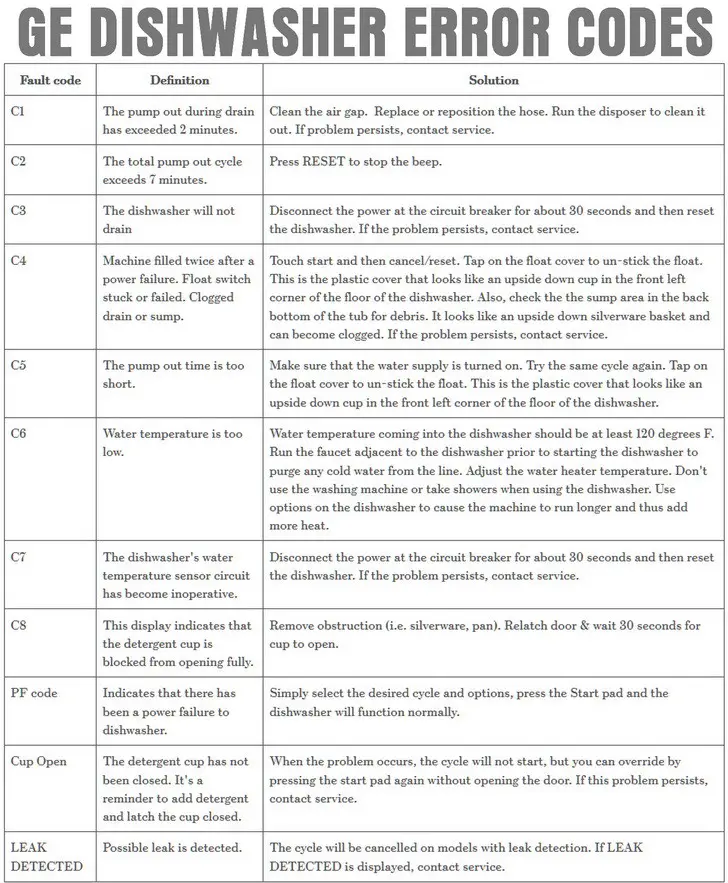
Drain-related errors are the most common GE dishwasher error codes. They typically indicate blockages, pump failures, or sensor issues. Understanding what each code means helps you act fast.
FED: Flood Detected
FED means your dishwasher detected water where it should not be, usually during startup or standby. The system shuts down to prevent overflow, even if the tub looks dry. This is often a false alarm caused by a blocked pressure sensor or stuck float switch.
What to check:
- Pressure sensor clogged with grease or food
- Flood float stuck in raised position
- Moisture in wiring after power outage
Quick fix: Clean the pressure sensor. About 80% of FED cases resolve with this one step.
FTD: Failure to Drain
FTD or H2O means water remains in the tub after the drain cycle. This often follows a C1 or C2 code. While it may seem like a pump issue, about 70% of cases stem from simple blockages.
Top causes:
- Kinked or clogged drain hose
- Garbage disposal knockout plug still installed
- Food debris in sump or filter
Pro tip: Always verify the drain hose has a high-loop under the sink. Without it, siphoning can cause poor drainage and trigger FTD.
C1: Drain Takes Over 2 Minutes
C1 triggers when the initial pump-out exceeds two minutes. It is a warning sign. Fix it before it escalates to C2.
Immediate checks:
- Air gap clogged (common in kitchen sinks)
- Drain hose bent behind the unit
- Knockout plug in garbage disposal
Action: Remove and clean the main filter. Run a vinegar flush through the drain path to dissolve buildup.
C2: Total Drain Time Over 7 Minutes
C2 means the dishwasher tried to drain for more than 7 minutes. It usually follows C1 and signals a serious blockage or failing pump.
Response required: Press Reset to stop beeping. Do not ignore this code.
Troubleshooting:
- Test drain pump in Service Mode (Test 1)
- Listen for humming, which indicates power but mechanical jam
- Check for blown thermal fuse in wire harness
C3: Failed to Drain Completely
C3 appears when water remains after multiple drain attempts. Start with a power reset.
Steps:
- Turn off power at the breaker for 30 seconds.
- Restore power.
- Check sump area for debris (remove bottom rack and filter).
If the pump hums but does not drain, test motor continuity. Should read 11 to 24 ohms. A reading of 0 or infinity means the pump is dead.
C4: Float Stuck After Power Failure
C4 often follows a power outage. The system thinks the float is stuck, preventing normal operation.
Fix:
- Locate the float (front-left corner of tub floor).
- Tap gently on the plastic cover.
- Manually lift and release the float to free it.
Clear the code by pressing Start, then Cancel/Reset.
C5: Drain Cycle Too Short
C5 means the drain phase ended prematurely. This usually is not a pump issue. It is a fill problem.
Likely causes:
- Water supply valve turned off
- Float switch stuck open
- Low incoming water pressure
Solution: Open the supply valve fully. Run hot water at the sink until steaming, then restart the dishwasher.
Solve Heating and Temperature Errors
Temperature-related GE dishwasher error codes indicate the water is not heating properly or sensors are malfunctioning. These affect cleaning performance and sanitization.
C6: Incoming Water Too Cold
C6 means the dishwasher did not detect at least 120°F water at startup. The heater will not activate until it does.
Fix fast:
- Run the kitchen faucet for 2 to 3 minutes until water is hot.
- Set your water heater to 120 to 140°F.
- Avoid using hot water elsewhere during the cycle.
Pro tip: Use a thermometer at the sink to confirm actual temperature. Many homes run below 120°F.
C7: Temp Sensor Circuit Failed
C7 indicates a broken circuit in the temperature sensor, usually due to wiring damage or a failed flood switch.
Reset first: Cut power for 30 seconds. If C7 returns:
Test the sensor:
- Disconnect power.
- Measure resistance across sensor wires.
- Should read approximately 11,000 ohms at room temperature.
If out of range, replace the flood switch assembly. The sensor is not sold separately on most models.
F16: Water Too Hot
F16 is a safety shutdown triggered when water exceeds safe limits. It protects against scalding and component damage.
Diagnose:
- Power off.
- Inspect wiring to temperature sensor.
- Test sensor resistance (should be approximately 11,000Ω).
- Replace flood switch if faulty.
Note: A shorted sensor can send false high-temp signals.
F50 / F51: Sensor Failure
F50 and F51 mean the control board cannot read the temperature sensor. These codes often follow power surges or moisture exposure.
Action plan:
- Shut off power.
- Check sensor wiring for corrosion or looseness.
- Test resistance (approximately 11,000Ω).
- Replace flood switch if defective.
F97: Heater Not Working
F97 means the heating element failed to activate. This affects drying and sanitizing.
Test the element:
- Power off.
- Disconnect wires from heater terminals.
- Measure resistance: should be 11 to 24 ohms.
- Infinite resistance equals failed element.
Replace the heating element (costs $15 to $40). Also inspect the wire harness for a blown thermal fuse.
F99: Wash Temp Not Reached
F99 means the dishwasher could not heat water to the required level. This could be the heater, sensor, or both.
Dual check:
- Test heating element (11 to 24Ω).
- Test temperature sensor (approximately 11,000Ω).
Replace the faulty part. If both test good, suspect the control board.
Fix Control and Communication Errors

Control-related GE dishwasher error codes involve communication between the user interface, main board, and inverter. These often require electrical testing.
F2: UI and Main Board Not Talking
F2 means the control panel cannot communicate with the main board. The dishwasher may not respond to inputs.
Troubleshoot:
- Power off.
- Inspect wire harness between UI and main board.
- Reconnect loose plugs.
- Look for burn marks or frayed wires.
Replace the wire harness if damaged. If the problem persists, replace the user interface or electronic control board.
F3: Inverter Board Misconfigured
F3 points to a configuration error on the inverter board, which powers the circulation and drain pumps.
Fix:
- Power off.
- Check all connections on the inverter board.
- Re-seat loose wires.
- Replace wire harness if damaged.
If connections are secure, replace the inverter control board.
F5: Inverter Communication Lost
F5 means the main board is not receiving signals from the inverter. This often follows F3.
Steps:
- Power off.
- Inspect harness between inverter and main board.
- Replace harness if burnt or open circuit.
- Replace inverter board if wiring is good.
- If issue remains, replace electronic control board.
Warning: Both boards must be compatible. Mixing old and new firmware can cause failure.
F64: Inverter System Error
F64 is a general inverter fault. It may cause pump failure or mid-cycle shutdown.
Diagnosis:
- Power off.
- Check connections on inverter and main board.
- Replace wire harness if damaged.
- Replace inverter control board if connections are solid.
F112: Keypad Stuck
F112 means one or more buttons are registering as constantly pressed, often due to spills or wear.
Fix:
- Press each button to identify the stuck one.
- Try freeing it with gentle tapping.
- If unresponsive, power off and replace the user interface control.
F144: Inverter Board Dead
F144 means the inverter board has failed completely. It often follows repeated F3 or F5 errors.
Solution: Replace the inverter control board. No repair is possible.
F145: No Power to Inverter
F145 means the inverter is not receiving AC power. The dishwasher may not start or drain.
Steps:
- Power off.
- Check wiring to inverter board.
- Test continuity in power harness. Look for blown thermal cut-off fuse.
- Replace harness if fuse is open.
- If board gets power but still fails, replace inverter board.
Diagnose Sensor and Feedback Failures

Sensor-related GE dishwasher error codes indicate problems with water detection, turbidity measurement, or diverter operation.
F35: Diverter Not Responding
F35 means the diverter motor, which directs water to upper or lower spray arms, is not sending feedback.
Symptoms: Poor cleaning in upper rack.
Fix:
- Power off.
- Check diverter wiring.
- Reconnect loose wires.
- Replace diverter motor if wiring is intact.
F48 / F49 / F52: Turbidity Sensor Failed
These codes mean the water clarity sensor is not working. The dishwasher cannot adjust wash intensity.
Repair:
- Power off.
- Inspect sensor wiring.
- Replace turbidity sensor or wire harness if damaged.
F80 / F96: No Water Detected
F80/F96 means the turbidity sensor reports no water. Either the tub did not fill, or the sensor is faulty.
Two paths:
- No fill? Check water supply valve. Test inlet valve in Service Mode (Test 2).
- Tub filled? Inspect turbidity sensor wiring. Replace sensor or harness.
Handle Mechanical and Operational Alerts
Mechanical and operational GE dishwasher error codes relate to door switches, leaks, and user alerts.
F33: Door Switch Fault
F33 means the control board cannot detect the door is closed.
Fix:
- Power off.
- Inspect door switch wiring.
- Test continuity.
- Replace door switch or wire harness if faulty.
DIY tip: Replace the entire latch assembly. Takes 30 minutes, moderate difficulty.
F34: Water Leak Detected
F34 means a leak was found, usually at the base. Some models lock out after repeated leaks.
Action:
- Turn off power and water.
- Inspect hoses, pump, door seal, and tub.
- Tighten connections.
- Replace leaking parts (pump seal, hose, etc.).
F128: Rinse Agent Low
F128 is a reminder, not a fault. Refill the rinse agent dispenser.
Note: No component failure. Dishwasher continues normal operation.
Cup Open: Detergent Cup Not Closed
Cycle will not start if the detergent cup is open.
Fix: Close it securely.
Override: Press Start again without opening the door.
PF: Power Failure Detected
PF means the dishwasher lost power mid-cycle.
Resume operation:
- Select cycle and options.
- Press Start.
Note: Modern models auto-restart. Older ones require manual input.
Run Built-In Diagnostics
GE dishwashers store error history. Access it with Fault Mode and Service Mode to test components before buying parts.
Enter Fault Mode
Steps:
- Press and hold Start + Cycle for 5 seconds.
- Lights flash or display shows version and codes.
Model tip: High-end models (Monogram) may use different sequences. Check the tech sheet behind the toe-kick panel.
Read Stored Error Codes
After entering Fault Mode:
- “0” = No faults
- Non-zero = Active or past error (e.g., FED, FTD)
Cross-reference with your model manual. Same code can mean different things across models.
Use Service Mode for Component Tests
After Fault Mode, press and hold Cycle for 5 seconds to enter Service Mode.
Available tests:
- Test 1: Drain Pump
- Test 2: Water Inlet Valve
- Test 3: Circulation Pump
- Test 4: Heating Element
- Test 5: Detergent Dispenser
Test 1: Drain Pump
Procedure:
- See Test 1 on display.
- Press Start. Pump runs.
- Press Start again to stop.
- Press Cycle to advance.
Failure signs:
- No sound
- Humming but no drainage
- Water not moving
Check: Clogs, impeller, motor continuity (11 to 24Ω).
Test 2: Water Inlet Valve
Procedure:
- See Test 2.
- Press Start. Water should flow in about 60 seconds.
Failure signs:
- No fill
- Slow fill
- Overfill
Causes: Clogged inlet screen, failed solenoid, low water pressure.
Fix FED/FTD: Step-by-Step
These are the most common GE dishwasher error codes. Follow this sequence for highest success rate.
Step 1: Clean the Pressure Sensor
Why it works: A clogged sensor reads false high water levels.
Tools: Screwdriver, toothpick, soft brush
Steps:
- Unplug dishwasher or cut power.
- Shut off water.
- Remove kick plate (screws at bottom).
- Find white elbow with black sensor near base.
- Twist elbow up, unclip sensor.
- Clean pinhole in sensor and elbow with toothpick.
- Reassemble.
Time: 10 to 15 minutes. Success rate: 80%.
Step 2: Clear the Drain Hose
Common issues:
- Hose kinked behind unit
- No high-loop installed
- Knockout plug in disposal
Steps:
- Pull dishwasher out (get help. It is heavy).
- Inspect hose. No sharp bends.
- Ensure high-loop is attached under countertop.
- Disconnect from disposal. Confirm knockout plug is removed.
- Flush with low-pressure water.
Pro tip: Replace hose every 5 years. Cost: $14 to $50.
Step 3: Inspect the Flood Float
Location: Center of sump (under filter).
Steps:
- Remove bottom rack and filter.
- Find dome-shaped float.
- Lift and lower it. Should move freely.
- Tap with wooden spoon if stuck.
Replace if: Damaged or unresponsive. Part: WD21X23498 ($13 to $30). Snap-in install.
Prevent Future Errors
Regular maintenance prevents most GE dishwasher error codes from recurring.
Monthly Maintenance
Keep your dishwasher running smoothly:
- Clean filter assembly
- Wipe door gasket
- Inspect spray arms for clogs
Every 3 Months
- Clean pressure sensor access point
- Flush drain hose with vinegar
Annually
- Run a cleaning cycle (Affresh or Glisten)
- Test door latch and switch
After Long Inactivity
If unused for more than 30 days:
- Run a rinse cycle first
- Check for FED codes
- Reset power (off for 2 minutes)
- Drain base pan if needed
Power Outage Recovery
After a blackout:
- Turn off power for 2 minutes.
- Restore power.
- Enter Fault Mode to check for stored codes.
- Run Test 1 (drain) to clear residual water.
Key Takeaways for Fixing GE Dishwasher Error Codes
Most GE dishwasher error codes stem from simple blockages, sensor dirt, or loose connections. The FED and FTD codes are the most common, and cleaning the pressure sensor resolves about 80% of these cases. Always check the garbage disposal knockout plug and drain hose high-loop before assuming a pump failure.
Use Service Mode to test components before buying parts. This approach saves money and prevents unnecessary repairs. Test the drain pump motor continuity (11 to 24 ohms), heating element (11 to 24 ohms), and temperature sensor (approximately 11,000 ohms) before replacing any expensive control boards.
With this guide, you can fix 90% of issues yourself, saving time and money. Always verify your model number and consult the tech sheet for exact procedures. When in doubt, clean first, test next, and replace last.
Frequently Asked Questions About GE Dishwasher Error Codes
What does FED mean on my GE dishwasher?
FED stands for Flood Error Detection. It means the control board detected an abnormally high water level, even if the tub appears dry. This is usually caused by a clogged pressure sensor or stuck flood float. Cleaning the pressure sensor resolves about 80% of FED cases.
How do I clear a GE dishwasher error code?
Most GE dishwasher error codes clear after addressing the underlying cause. Try a power reset by turning off the breaker for 30 seconds, then restoring power. For codes like C4, press Start then Cancel/Reset. Some codes require component repair before clearing.
Why does my GE dishwasher keep showing FTD or H2O?
FTD (Failure to Drain) and H2O indicate water is not draining properly. Common causes include a kinked drain hose, clogged filter, garbage disposal knockout plug still in place, or drain pump failure. Check these simple items first before replacing the pump.
Can I use my dishwasher with an error code displayed?
It is not recommended. Most error codes trigger safety shutoffs to prevent water damage or electrical issues. Using the dishwasher with an active error code can worsen the problem or cause additional damage. Troubleshoot and resolve the code before running a cycle.
How do I enter diagnostic mode on my GE dishwasher?
Press and hold Start + Cycle buttons for 5 seconds to enter Fault Mode. The display will show version and stored error codes. Press and hold Cycle for 5 seconds more to access Service Mode for component testing.
Are GE dishwasher error codes the same across all models?
No. GE uses a non-standardized system that varies by model line, production year, and control board design. Always consult your specific owner manual and verify your model number before diagnosing. The same code can mean different things on different models.





