Samsung Dishwasher Blinking: Quick Fix Guide
Your Samsung dishwasher starts blinking with no display, no error code, just a pulsing Normal or Heavy light. It might even turn on by itself, drain water, and keep blinking. This frustrating behavior affects thousands of Samsung dishwasher owners, and the blinking lights are not random. They are built-in error signals designed to alert you to specific problems.
The Normal or Heavy light blinking typically means your dishwasher has triggered a leak sensor or detected a drainage failure. These models use blinking lights as a silent alarm because they lack digital displays. With the right steps, over 80% of cases can be fixed at home, often in under an hour, saving you $300 or more in service calls.
What Blinking Normal or Heavy Lights Mean on Your Samsung Dishwasher
Samsung dishwashers use light combinations to signal faults since most models lack a digital display. The Normal and Heavy lights carry the most critical alerts, and understanding what they mean is the first step to fixing the problem.
Normal Light Blinking: Leak Sensor Activated
A blinking Normal light means the leak sensor has detected water in the base pan under the tub. Samsung Support confirms: “The normal blinking light means the dishwasher’s leak sensor detects moisture.” This activates a safety mode where the dishwasher may auto-start and drain, even when turned off. The trigger can be as little as 10-45 ml of water, often from a clogged drain or suds buildup rather than a major leak.
Heavy Light Blinking: What It Indicates
The meaning of a blinking Heavy light depends on your model. If your model has no Express 60 button, it likely indicates leak sensor activation. If your model has Express 60 or Quick+, it typically signals a drainage failure or over-fill condition.
Multi-Light Error Code Patterns
Samsung uses combinations to narrow down faults. Heavy + Auto means too much water in the tub from drainage or over-fill issues. Heavy + Delicate indicates a heating element failure. Heavy + Express 60 means no water heating during the cycle. Heavy only with no Express 60 points to leak sensor activation, while Heavy only with Express 60 suggests a drain pump or hose blockage.
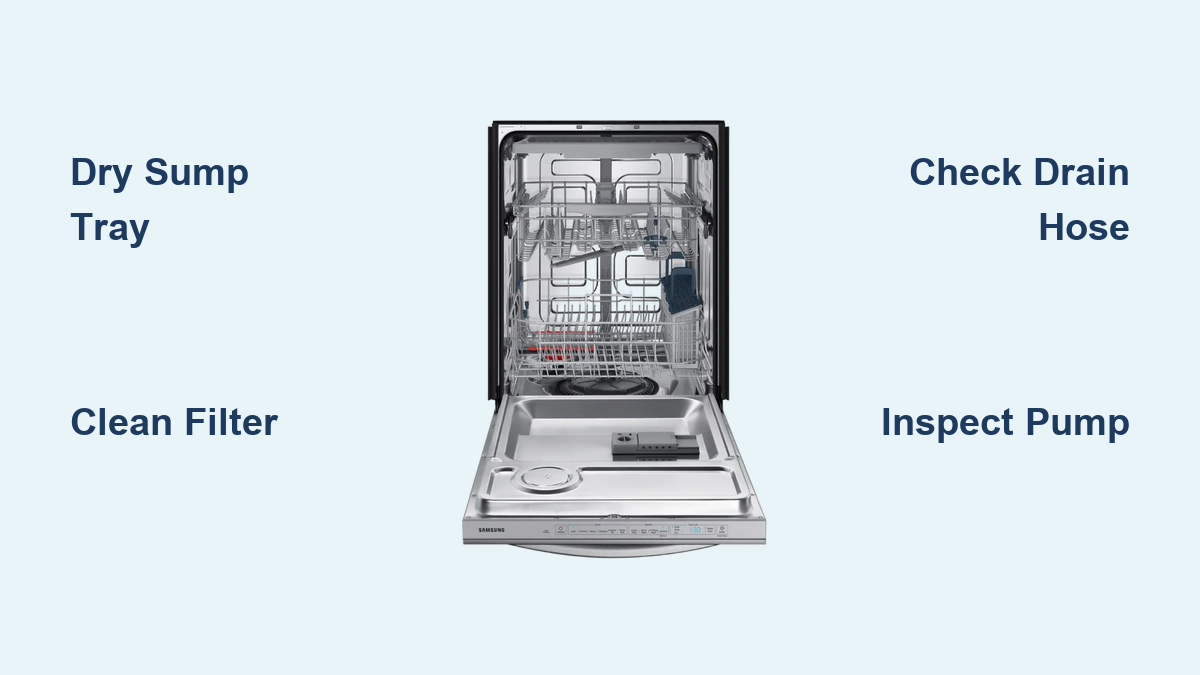
Dry the Sump Tray to Stop False Leak Alarms

If the Normal or Heavy light is blinking and the unit keeps auto-starting, the most likely cause is water in the sump tray under the dishwasher. This triggers the Styrofoam float switch, telling the system there is a leak.
Step 1: Unplug and Access the Base
Turn off power at the circuit breaker. Wait 5 minutes to reset the control board. Remove the front kick plate, which usually snaps off or has two screws. Look inside the base to locate the white Styrofoam float in the sump tray.
Step 2: Remove Standing Water
Use paper towels, a sponge, or a wet/dry shop vacuum to extract all visible water. Even small amounts can keep the sensor active. Dry thoroughly: sump tray, float housing, and surrounding area. Moisture left behind can cause false reactivation.
Step 3: Inspect the Float and Switch
Lift the Styrofoam float. It should be light, dry, and intact. If it is cracked, waterlogged, or stuck, it will not reset properly. Clean debris around the switch if the float does not move freely. Replace if damaged.
Step 4: Reassemble and Test
Reattach the kick plate. Restore power. Run a short Auto cycle. Confirm no blinking lights, no auto-restart, and proper drainage.
Clean the Filter to Prevent Drain Errors
A clogged filter is a top cause of Heavy light blinking, especially in models with Express 60. Food debris, grease, and mineral buildup block water flow, leading to drain failure.
How to Clean the Filter
Remove the lower rack and spray arm if needed. Locate the cylindrical filter at the tub bottom. Twist counterclockwise to remove. Soak in warm, soapy water for 5 minutes. Scrub with a soft-bristle brush. Avoid metal scrubbers. Inspect for cracks, holes, or deformation. Replace if damaged.
Why It Matters
A dirty filter slows drainage, causing water to back up into the sump. This can trigger the leak sensor even if no actual leak exists. Regular cleaning prevents 80% of false drainage alarms. Clean the filter on the 15th of each month to prevent clogs.
Check and Unclog the Drain Hose
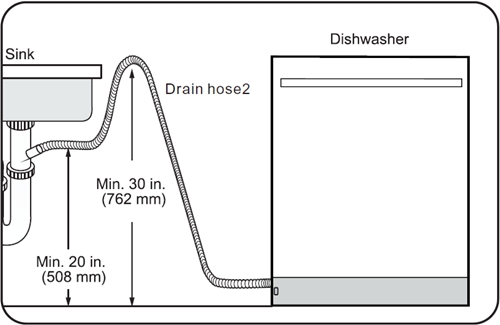
A kinked, clogged, or improperly installed drain hose can cause backflow or siphoning, leading to blinking lights.
Install a High Loop
The drain hose must form a loop at least 20 inches above the floor. Secure it under the countertop with a zip tie or clamp. Without a high loop, sink water can siphon back into the dishwasher.
How to Unclog the Drain Hose
Turn off power and water. Disconnect clamps at both ends. Use a tube brush or paper towel on a wire to push out debris. Flush with hot water. Reconnect and test. If the hose connects to a disposal, ensure the inlet is clear and the unit is off during cycles.
Clear Blockages from the Drain Pump
If the Heavy light blinks and the dishwasher is not draining, the drain pump impeller may be jammed.
Access the Drain Pump
Unplug the dishwasher and turn off the water. Pull the unit out from under the counter. Flip it on its back using towels to protect the finish. Remove bottom plastic panels. Disconnect the leak sensor wire and drain hose. Rotate the drain pump ¼ turn counterclockwise and pull it out.
Inspect and Clean
Look for foreign objects like popcorn, toothpicks, coins, or glass. Manually spin the impeller. It should turn freely. Clean with a soft brush. Reinstall and test.
Test for Electrical Failure
Set multimeter to x1 ohms. Touch probes to pump terminals. Near zero ohms means good. Infinite reading means failed motor. Replacement costs $60-$120.
Test the Inlet Valve for Over-Filling Issues
A failed inlet valve can cause over-filling, leading to overflow and leak sensor activation.
Symptoms of Failure
Water keeps running during the cycle. The unit over-fills and leaks. There is no water intake at all.
How to Test and Replace
Turn off water and power. Remove kick plate. Disconnect fill hose and wire harness. Use multimeter to test continuity. Infinite reading means solenoid failed. Replace the valve for $30-$50.
Inspect the Float Switch for Faults
The float switch prevents over-filling. If stuck or failed, it can cause continuous water intake and trigger the leak sensor.
Location and Testing
Found at the bottom of the tub under the spray arm. Remove spray arm and filter to access. Disconnect wires from the switch. Use multimeter to check continuity. No continuity or erratic reading means replacement needed. Common issues include sticky switch from food debris, corroded contacts, and loose wiring.
Replace a Leaking Door Gasket
A cracked or warped door gasket can leak under high pressure, dripping water into the base pan.
Signs and Replacement
Water pools under the unit. Mold or mildew on gasket. Visible cracks or warping. Clean monthly with vinegar solution. Lubricate every 6 months with food-safe silicone grease. Replacement costs $30-$50.
Prevent Future Blinking with Regular Maintenance
Most blinking light issues are preventable with simple habits.
Monthly Maintenance Checklist
Clean the filter on the 15th of each month. Inspect P-trap and drain hose monthly. Wipe down door gasket monthly. Check for under-unit moisture monthly. Use one pod or 1 tablespoon powder per load.
Detergent Tips
Avoid powder detergents. They create excessive suds that migrate into the sump. Switch to single-dose pods. They reduce suds-related false alarms by 70%. Never use bleach-based cleaners or non-dishwasher-safe additives.
Installation Must-Dos
Create a high loop in the drain hose to prevent backflow. Secure all connections to avoid kinks or loose clamps. Level the unit to ensure proper drainage and spray arm movement.
When to Call a Samsung Technician
Some issues require professional help.
Call Samsung If
You find a visible leak in the tub, hoses, or valve. The control board is suspected with no lights or unresponsive panel. Multiple components have failed. Your dishwasher is under warranty.
How to Get Service
Visit the Samsung support portal. Have your model number and serial number ready. Do not open internal components unless authorized, as this voids the warranty.
Frequently Asked Questions About Samsung Dishwasher Blinking
Why does my Samsung dishwasher Normal light keep blinking?
The Normal light blinking means the leak sensor has detected moisture in the base pan. This is usually caused by water in the sump tray from a clogged drain, excessive suds, or a faulty float switch. Dry the sump tray and check for clogs to resolve this.
Why does my Samsung dishwasher Heavy light blink during cycles?
The Heavy light blinking usually indicates a drainage failure or over-fill condition. Check the filter for clogs, inspect the drain hose for kinks or blockages, and ensure the drain pump is not jammed with debris.
Can I fix a blinking Samsung dishwasher myself?
Yes. Over 80% of blinking light issues can be fixed at home. Start by drying the sump tray and cleaning the filter. These steps resolve most cases without professional service.
Why does my Samsung dishwasher turn on by itself and blink?
This happens when the leak sensor detects water in the base pan. The dishwasher auto-starts to drain the water. Dry the sump tray completely to stop this behavior.
How much does it cost to repair a Samsung dishwasher with blinking lights?
Most repairs cost $0-$120 depending on the issue. Filter cleaning is free. A new drain pump costs $60-$120. Float switch replacement costs $20-$40. Professional service typically costs $300 or more.
Will resetting my Samsung dishwasher stop the blinking?
Resetting may help if the issue is a temporary glitch. Unplug the dishwasher or turn off the circuit breaker for 5 minutes. If the blinking returns, there is an underlying issue that needs to be addressed.
Key Takeaways for Fixing Samsung Dishwasher Blinking Lights
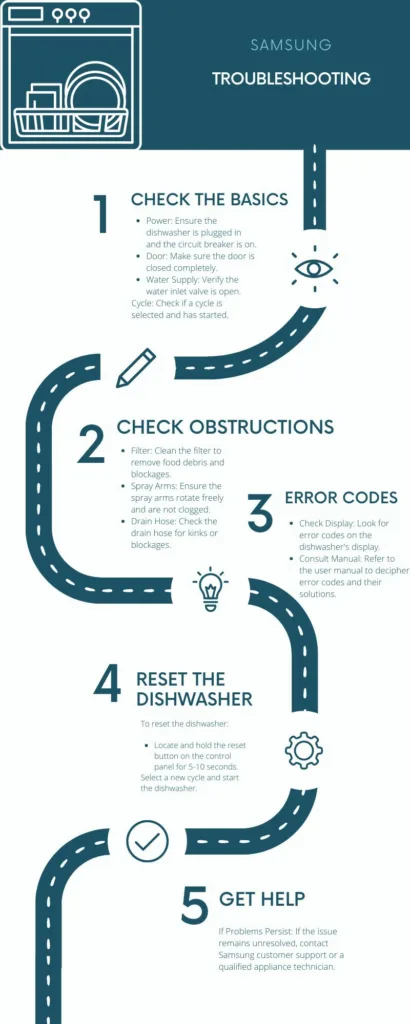
The Normal or Heavy light blinking on your Samsung dishwasher is an error signal, not a random malfunction. In most cases, it indicates water in the sump tray triggering the leak sensor or a drainage problem that needs attention. The good news is that over 80% of these issues can be resolved at home with basic tools and minimal time investment.
Start troubleshooting by drying the sump tray and cleaning the filter. These two steps address the most common causes and resolve the majority of blinking light cases. If the problem persists, check the drain hose for clogs, inspect the drain pump for blockages, and test the inlet valve and float switch for electrical faults.
Prevent future occurrences by cleaning the filter monthly, using single-dose detergent pods instead of powder, ensuring proper drain hose installation with a high loop, and performing regular visual checks under the unit. These simple maintenance habits will keep your Samsung dishwasher running smoothly for years without mysterious blinking lights or unexpected service bills.