Samsung Dishwasher Error Codes Solved
Is your Samsung dishwasher flashing a cryptic code and refusing to run? These error codes are your machine’s way of telling you exactly what’s wrong. Understanding Samsung dishwasher error codes can save you a service call and get your dishwasher running again in minutes. Most errors stem from simple issues like clogged filters, kinked hoses, or improper detergent use—problems you can fix yourself.
This guide covers every major Samsung dishwasher error code, from 4C water supply failures to LC leak detection alerts. Each section explains what the code means, why it appears, and step-by-step instructions to resolve it. You’ll also learn preventive maintenance tips to keep these errors from recurring.
Fix 4C or 4E: Water Supply Failure

The 4C or 4E error code means your dishwasher failed to fill with water within the expected time. This is one of the most common Samsung dishwasher error codes, and it’s often caused by something simple.
What Triggers 4C/4E
The control board monitors water flow during the fill cycle. If water doesn’t reach the proper level within 2 to 5 minutes, the error triggers. Common causes include a partially closed water valve, kinked inlet hose, low water pressure below 20 psi, or using flood-safe hoses that restrict flow. Water temperature below 104°F can also cause this error in some models.
Step-by-Step Fix
Check the water shut-off valve under your sink and ensure it’s fully open. Inspect the inlet hose for kinks or crushing, and replace it with a braided stainless steel hose if needed. Verify your home water pressure is between 20 and 120 psi by testing other faucets. Disconnect the hose and clean the filter screen at the connection point. Run the kitchen hot water tap for 30 to 60 seconds before starting the dishwasher to stabilize temperature. Finally, turn off power at the circuit breaker for 30 seconds, then restore and restart.
If the error persists after these steps, the water inlet valve or pressure sensor may be faulty and require professional replacement.
Clear 5C, SC, or SE: Drain Failure
5C, SC, or SE indicates your Samsung dishwasher cannot drain properly. Water remains at the bottom of the tub, and the cycle stalls.
Why Drain Errors Occur
This error appears when the float switch or pressure sensor detects water remaining after the drain phase exceeds 2 minutes. Causes include a clogged filter or sump, blocked garbage disposal, kinked drain hose, missing high loop, or a faulty drain pump.
How to Fix Drain Issues
Run the garbage disposal and flush the sink with hot water to clear debris. Check that your drain hose has a high loop at least 20 inches above the floor to prevent backflow. Remove the bottom rack and take out the filter assembly. Rinse filters under running water and use a soft brush for stuck debris. With power off, inspect the sump area for foreign objects blocking the impeller. Turn off the breaker for 30 seconds, then restore power and restart the cycle.
If the pump runs but no water moves, the impeller may be broken. If the pump is silent, the motor, wiring, or control board may be faulty.
Resolve LC or LE: Leak Detection Error

LC or LE means moisture was detected under the dishwasher. This doesn’t always mean there’s an actual leak—sometimes it’s a false trigger from suds or condensation.
Real Leak vs. False Alarm
If you see water, check the door gasket for cracks, inspect all hose connections for leaks, and look at spray arm O-rings for deterioration. If no water is visible, the error may be caused by suds residue from wrong detergent, condensation in humid cabinets, spills not fully dried, or detergent buildup on the sensor.
How to Reset LC/LE
Turn off power at the circuit breaker and wait 30 seconds. Pull the dishwasher out from the cabinet and remove the bottom panel. Dry the drip pan, moisture sensor, and surrounding area completely. Check for corrosion on wiring connections. Reassemble and run a short cycle to verify the error is cleared.
Many users report LC errors after using gel detergents. Switching to pods reduces suds and prevents false alarms.
Fix 1E or IE: Waterwall Filter Blockage
1E or IE on Waterwall models means water isn’t flowing through the fine filter properly. This model uses a rotating water blade, and clogs disrupt the spray pattern.
Causes and Fixes
Remove the multi-part filter assembly and rinse it under warm water. Use a soft brush to remove grease and mineral deposits. Reinstall the filter carefully—misalignment blocks flow and triggers the error. Restart the cycle. If the code returns, the circulation pump may be faulty.
Note that on non-Waterwall rotary models, IE may indicate a high-temperature heater issue instead.
Solve 3E: Water Too Hot
3E means incoming water exceeds 176°F, which can damage internal components and trigger thermal protection.
How to Fix 3E
Adjust your home water heater to 120°F. Samsung recommends connecting the dishwasher to the cold water line only. Run the kitchen tap hot water for 30 to 60 seconds before starting the cycle to stabilize temperature. Turn off power at the breaker for 30 seconds, then restore.
If 3E persists, the mixing valve or temperature sensor may be malfunctioning.
Address 7E: Waterwall Reflector Stuck
7E appears only on Waterwall models and means the rotating water reflector isn’t moving properly.
Common Causes
Packing tape may still be attached after installation. Dishes or utensils could be blocking rotation. The reflector may be misaligned or jammed.
Fix Steps
Open the door and visually inspect the Waterwall arm. Remove any packing materials from new units. Ensure no large items are blocking rotation. Gently spin the reflector to confirm it moves smoothly. If 7E returns, the motor or gear assembly may need professional replacement.
Troubleshoot HE or tE: Heating Problems
HE indicates the heater can’t reach the required temperature. tE means the temperature sensor is reporting inaccurate readings.
Quick Fixes
Run a normal cycle to see if the error clears on its own. Turn off power at the breaker for 5 to 10 minutes, then restart. If dishes remain wet after cycles, the heating element may not be working properly. These issues typically require professional diagnosis and replacement parts.
Handle bE or 6E: Stuck Control Button
bE or 6E means a control panel button is stuck or the panel is malfunctioning.
Fixes
Press each button firmly to release any stuck switch. Wipe the control panel with a dry cloth. Restart the unit. If the error persists, the membrane switch or control board may need replacement.
Understand AP Mode: Wi-Fi Setup, Not an Error
AP is not a fault—it’s Access Point mode for connecting the dishwasher to Wi-Fi via the SmartThings app. This appears during initial setup or after a network reset.
How to Handle It
Follow the app instructions to complete Wi-Fi setup. If you’re not configuring wireless features, restart the dishwasher to exit AP mode.
Fix OC or 0C: Over-Level Water
OC means too much water has accumulated in the tub, often linked to drain problems.
Causes and Solutions
Clean the filter, drain hose, and sump area. Ensure the drain hose has a proper high loop to prevent backflow. Check if the dishwasher is continuously filling—if so, the inlet valve may be stuck open. Call a technician if the problem continues.
Resolve PC or PE: Zone Wash Errors
PC indicates a Zone Wash failure. PE means the half load function isn’t working correctly.
Fixes
Restart the cycle. Ensure dishes are distributed evenly across racks. Clean spray arms to remove blockages. If these errors repeat, the zone valve or sensor may need professional service.
General Reset and Prevention Tips
How to Reset Your Samsung Dishwasher
Press and hold Start for 3 to 5 seconds to cancel the cycle. Turn off power at the circuit breaker for 30 seconds. Restore power and restart. This clears many transient errors.
Weekly Maintenance Checklist
Clean the filter assembly. Wipe the door gasket. Inspect spray arms for clogs. Run the hot tap before starting. Use pods or recommended detergent only.
Detergent Do’s and Don’ts
Use dishwasher-specific pods, gel, or powder. Never use hand soap—it causes excessive suds and triggers LC errors. Don’t overfill rinse aid or detergent dispensers.
When to Call Samsung Service
Contact Samsung if error codes persist after troubleshooting, the pump is silent or makes grinding noises, visible leaks can’t be traced, the heater isn’t working, or the control panel is unresponsive. Have your model and serial number ready.
Frequently Asked Questions About Samsung Dishwasher Error Codes
What does 4C mean on my Samsung dishwasher?
4C indicates a water supply failure. The dishwasher didn’t fill with water within the expected time. Check that the water valve is fully open, the inlet hose isn’t kinked, and water pressure is adequate.
How do I fix the LC error on my Samsung dishwasher?
First, determine if there’s actual water leaking. If yes, check door seals and hose connections. If no water is visible, dry the moisture sensor and drip pan by pulling out the dishwasher and removing the bottom panel. A power reset often clears false alarms.
Can I fix a 5C drain error myself?
Yes. Clean the filter assembly, clear the garbage disposal, ensure the drain hose has a high loop, and check for kinks. If the error persists, the drain pump may need professional inspection.
Why does my Samsung dishwasher show 3E?
3E means the incoming water is too hot, exceeding 176°F. Lower your water heater to 120°F and ensure the dishwasher is connected to the cold water line.
Are Samsung dishwasher error codes covered under warranty?
Most Samsung dishwashers include a 1-year limited warranty covering parts and labor for defects. Warranty coverage depends on the specific issue and model. Contact Samsung with your model and serial number for coverage verification.
Key Takeaways for Resolving Samsung Dishwasher Error Codes
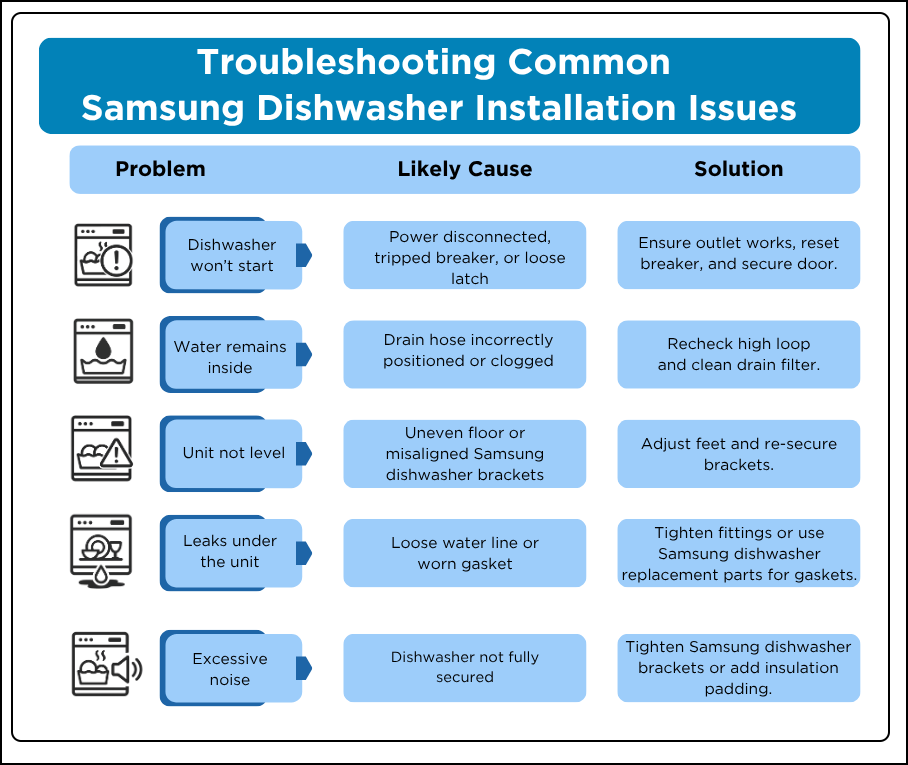
Most Samsung dishwasher error codes can be resolved with basic troubleshooting. The 4C and 4E errors typically stem from water supply issues—check valves, hoses, and pressure. Drain errors like 5C and SC usually require cleaning the filter and ensuring proper hose installation with a high loop. LC and LE leak detection errors often turn out to be false alarms caused by suds from wrong detergent. Keep this guide handy, perform regular maintenance, and you’ll resolve most errors without calling a technician.