How to Clean Samsung Dishwasher: Easy Steps
Is your Samsung dishwasher leaving dishes streaky, smelling musty, or struggling to drain? You are not alone. Over time, food debris, mineral buildup, and grease can clog filters, block nozzles, and reduce cleaning performance. The good news: a thorough cleaning restores efficiency, prevents error codes like 1E or IE, and extends your appliance’s life. This guide shows you exactly how to clean a Samsung dishwasher inside and out using simple tools and household items like vinegar and baking soda.
Whether you own a model with a micro filter, fine filter, or non-removable system, you will learn step-by-step procedures, pro tips, and preventive habits that keep your dishwasher running like new.
Wipe Down the Exterior
Use a Damp Cloth Only
Power off your dishwasher before cleaning. Dampen a soft, lint-free cloth with water. Add mild detergent only if the surface is greasy. Wipe the door edges, handle, and control panel gently. Avoid spraying water directly onto controls to prevent moisture damage.
Avoid Harsh Cleaners
Never use abrasive pads, bleach, or ammonia. These can scratch surfaces or degrade touchscreen panels. After wiping, dry with a clean towel to prevent water spots and streaks.
Sanitize the Interior Tub
Run a Vinegar Cycle
Place 1 cup of distilled white vinegar in a dishwasher-safe container on the lower rack. Close the door and select the Sanitize cycle. This reaches 163°F in the final rinse, killing bacteria and dissolving grime.
No Sanitize cycle? Use Heavy Duty or Normal Wash instead.
After the cycle, the tub looks brighter and smells fresh. Vinegar removes limescale, soap scum, and odors without damaging internal components.
Try the Self Clean Option If Available
Some Samsung models include a Self Clean cycle. Check your user manual via the Samsung Download Center by entering your model number. For best results, run Self Clean after a vinegar flush.
Clean the Spray Nozzles
Remove and Inspect Nozzles
Take out the lower rack to access the spray arms. To remove capped models, turn the cap counterclockwise, then lift off. For capless models, pull straight up. Check each hole for clogs. Common culprits include rice grains, seeds, or calcium deposits.
Soak in Vinegar Overnight
Place the nozzle in a bowl of distilled white vinegar for 8 to 12 hours. This dissolves hard water buildup. After soaking, scrub holes with an old toothbrush and rinse by running water through the arm.
Never use metal wires. They scratch plastic and impair water flow.
Reinstall and Test Rotation
Reattach the nozzle securely. For capped versions, twist clockwise until tight. Spin the arm by hand. It should rotate freely. If it sticks, recheck for obstructions or misalignment.
Remove and Clean the Filter
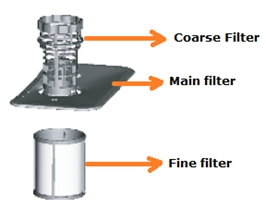
Identify Your Filter Type
Samsung uses three main filter systems. These include fine filter, micro filter, and non-removable filter. Consult your manual to confirm which one you have. Cleaning methods vary significantly.
Clean a Fine Filter System
- Open the dishwasher and remove the lower rack.
- Rotate the filter counterclockwise to unlock.
- Lift out the full assembly. This includes the filter insert and fine mesh layer.
- Rinse under warm water.
- Use a toothbrush to clear stuck debris. Do not tear the mesh.
- Dry completely before reassembling.
Reinstall correctly. Insert the filter insert first, then the fine filter, and rotate clockwise until flush and stable.
Clean a Micro Filter System
This system is common in newer models.
- Turn the filter handle counterclockwise to remove the cover.
- Lift out the cylindrical micro filter beneath.
- Rinse both parts under running water.
- Scrub gently with a brush for stubborn residue.
- Dry fully to prevent mold.
Replace in reverse order and lock by turning the handle clockwise.
Maintain Non-Removable Filters
If your model lacks a removable filter:
- Wipe the tub floor around the drain with a damp cloth.
- Pick out visible food chunks.
- Fill the detergent dispenser with regular dish soap.
- Run an empty Normal or Quick cycle.
This flushes residual particles but is not a substitute for deep cleaning. Prevent clogs by scraping dishes before loading.
Inspect the Drain Pump
When to Check the Pump
Clean the drain pump if water pools in the tub after cycles, you hear grinding noises, or error code 1E or IE persists after filter cleaning.
Access and Clean the Pump
- Remove the filter using your model’s method.
- Look at the pump housing underneath.
- On some models, use a Phillips screwdriver to remove two small screws near the wash arm base.
- Lift the cover and remove debris. Common items include fruit pits, plastic bits, or rice.
- Wipe the housing with a damp cloth.
- Reassemble carefully. Ensure all parts are sealed.
Not all models allow user access. If you cannot open the pump, contact Samsung support.
Perform a Full System Flush
Monthly Vinegar Flush Every 3 to 6 Months
For complete internal cleaning:
- Place 1 cup of vinegar upright in the lower basket.
- Run Sanitize or Heavy Duty cycle empty.
- Let the heat and acidity dissolve buildup in hoses, nozzles, and sump.
Never mix vinegar and detergent. They neutralize each other and create foam.
Follow With Baking Soda Optional
After a vinegar cycle:
- Sprinkle 1 cup of baking soda across the tub floor.
- Run a short Rinse cycle.
This deodorizes and brightens surfaces, ideal for eliminating lingering smells.
Prevent Future Buildup
Scrape, Do Not Pre-Wash
Remove large food scraps but skip pre-rinsing. Modern detergents need food enzymes to activate. Over-rinsing reduces cleaning power.
Exception: Avoid putting burnt-on or starchy residues like rice or pasta directly in.
Use the Right Detergent
Choose phosphate-free pods or powders designed for dishwashers. In hard water areas, avoid gels. They do not dissolve well. Use rinse aid to prevent spotting and improve drying.
Ensure Proper Water Temperature
The Sanitize cycle requires 120°F inlet water. If the Sanitize light blinks, run hot water at the sink for 30 seconds before starting the dishwasher. Set your home water heater to at least 120°F.
Cold water prevents the final rinse from reaching sanitizing temperature.
Troubleshoot Common Issues
Sanitize Light Blinking
This means water is too cold or heating is not working. Fix by pre-running hot water at the sink, increasing your water heater setting, or checking for circulation blockages.
Error Code 1E or IE
This indicates drainage failure. Clean the filter, inspect the drain pump, and check the drain hose for kinks or clogs.
Dishes Come Out Dirty
Likely causes include clogged nozzles, low detergent, or overloaded racks. Clean spray arms, use fresh sealed pods, and rearrange for better water access.
Bad Smell After Cycles
Odors come from trapped food. Clean the filter monthly, run a vinegar cycle quarterly, and wipe the door gasket and drain area.
Water Will Not Drain
Check the filter blockage, pump debris, and hose kinks under the sink. Clear all three before calling service.
Nozzle Is Not Spinning
Ensure holes are unclogged, no dish or rack is blocking rotation, and the arm spins freely when touched.
Know Your Model’s Limits
Filter Design Varies by Model
Examples include DW80K5050US which requires screw removal for full access, recent models which use micro filters with twist-off covers, and older units which may have fine mesh filters only.
Always verify steps using your exact model number. Visit the Samsung Download Center, enter your model, and download the manual.
Pro Tip: Write your cleaning dates on the manual or set phone reminders. Users who clean every 3 to 6 months report fewer errors and longer appliance life. This can mean 10 plus years versus 6 to 7 with neglect.
Final Checklist: Complete Cleaning Routine
• Wiped exterior with damp cloth
• Ran vinegar plus Sanitize cycle
• Removed, soaked, and cleaned nozzles
• Disassembled and rinsed filter
• Inspected and cleared drain pump if accessible
• Performed baking soda refresh optional
• Verified all parts reinstalled securely
• Tested with empty cycle, no leaks, proper drainage
Frequently Asked Questions About Cleaning a Samsung Dishwasher
How Often Should I Clean My Samsung Dishwasher Filter?
Clean the filter every 1 to 3 months. This frequency increases with heavy use or hard water conditions. A clogged filter causes drainage problems, odors, and poor cleaning performance.
Can I Use Bleach to Clean My Samsung Dishwasher?
No. Never use bleach, ammonia, or abrasive cleaners on your Samsung dishwasher. These chemicals damage interior components, degrade rubber seals, and can harm touchscreen panels. Use distilled white vinegar or baking soda instead.
Why Does My Samsung Dishwasher Smell Bad After Every Cycle?
Bad smells come from trapped food debris in the filter or drain area. Clean the filter monthly, run a vinegar cycle quarterly, and wipe the door gasket. These steps eliminate odors in 90% of cases.
What Does Error Code 1E or IE Mean on My Samsung Dishwasher?
Error code 1E or IE indicates a drainage failure. Clean the filter, inspect the drain pump for debris, and check the drain hose for kinks or clogs. If the error persists after cleaning these areas, contact Samsung support.
How Do I Know If My Samsung Dishwasher Has a Sanitize Cycle?
Check your user manual or control panel. The Sanitize option appears on Heavy Duty, Normal, or Pots and Pans cycles. Not all cycles support sanitization. The final rinse reaches 163°F when active.
Is It Normal for Water to Remain in the Bottom of My Dishwasher After a Cycle?
A small amount of water is normal. However, standing water that pools significantly suggests a clogged filter, blocked drain pump, or kinked drain hose. Clean these components to restore proper drainage.
Key Takeaways for Maintaining Your Samsung Dishwasher
Regular maintenance keeps your Samsung dishwasher efficient, quiet, and odor-free. Clean the filter every 1 to 3 months, run a vinegar deep clean every 3 to 6 months, and always scrape dishes before loading. These habits prevent most error codes, extend the life of your appliance, and ensure spotless dishes every time.
For model-specific guidance, always refer to your official Samsung manual. No two dishwashers clean exactly alike, and verifying your specific components ensures you address the right parts during cleaning. If you encounter persistent error codes or drainage issues despite thorough cleaning, contact Samsung support for professional assistance.