
How to Reset Frigidaire Dishwasher – Quick Guide
Is your Frigidaire dishwasher stuck, unresponsive, or flashing strange error codes? You’re not alone. A simple reset can often fix issues like frozen displays, failed cycles, or startup errors without needing a technician. The good news is that resetting a Frigidaire dishwasher is quick, safe, and something you can do in under five minutes. Whether your unit won’t start, shows an “i50” code, or just needs a reboot after a power surge, this guide gives you every proven method to get your dishwasher running again.
You’ll learn the most effective reset techniques, how to interpret error codes, when to suspect hardware failure, and what to do if a reset does not work. No guesswork, just clear, actionable steps based on verified technician procedures and real user outcomes.
Cancel Button Reset: The Fastest Fix
This is the most common way to reset a Frigidaire dishwasher. It works for most models and clears temporary glitches or stuck cycles in seconds.
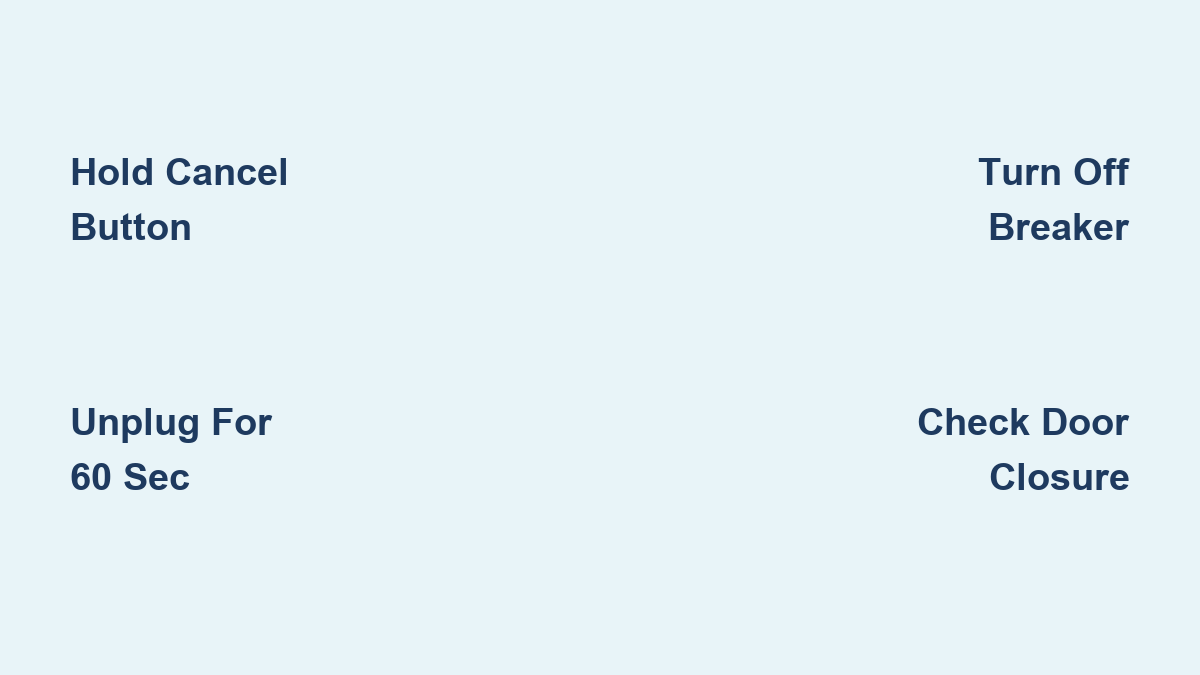
Hold Cancel for 3 to 6 Seconds
Open the door fully and press and hold the Cancel button for 3 to 6 seconds. On most models, the display will blink or turn off, signaling the reset. If an error code was showing like i50 or PF, it should disappear. Close the door securely and press Start briefly to begin a new cycle.
On models without a dedicated Cancel button, the Start button doubles as Cancel. Press and hold it for 6 seconds instead. This method typically resolves minor software hiccups, interrupted cycles, or accidental key presses.
Power-Cycle Reset for Frozen Controls

When the control panel is completely unresponsive or error codes return after a soft reset, a hard reset clears the electronic control board.
Unplug and Wait 60 Seconds
Unplug the dishwasher from the wall outlet. Alternatively, turn off the circuit breaker powering the unit. Wait at least 60 seconds to allow the control board to fully discharge. Shorter waits may not fully reset the board because the internal capacitor needs time to drain. Some technicians recommend up to 5 minutes for stubborn faults.
Restore power by plugging it back in or flipping the breaker on. Wait 10 to 15 seconds for the system to reboot, then try starting a cycle. This method is especially effective after power surges or when the display is frozen.
Breaker Reset for Persistent Errors

For persistent electrical faults or recurring error codes, a longer power disconnection ensures full system clearance.
Turn Off Breaker for 5 Minutes
Locate the dedicated circuit breaker for your dishwasher and switch it off. Leave it off for 5 full minutes to ensure complete system discharge. Turn the breaker back on and test the dishwasher by selecting a cycle and pressing Start.
This method is particularly effective for clearing i50, i60, or iC0 error codes linked to motor, heating, or control board faults. Unlike a quick power cycle, this method mimics a factory reset and is recommended when standard methods fail.
Model-Specific Reset Variations
While most Frigidaire dishwashers follow the same reset logic, control panel design varies by model. Knowing your model helps avoid confusion.
Gallery Series Models
If the panel is unresponsive on Frigidaire Gallery Series models like FDB636 or GRMC2273CD04, perform a power-cycle reset. After power returns, the unit may reboot automatically or require manual cycle start. If still not working, check for standing water because this can block startup due to safety sensors.
Models Without Dedicated Cancel Button
No separate Cancel button? Press and hold the Start button for 6 seconds. Look for display changes like blinking, blanking, or code clearing. Release, close the door, then restart the cycle.
Models With Dedicated Cancel Button
If a standalone Cancel button exists, press and hold it for 3 to 6 seconds. The display should respond by flashing or turning off. If nothing happens, ensure the door is fully closed because a misaligned door can prevent any reset from taking effect.
What Frigidaire Error Codes Mean
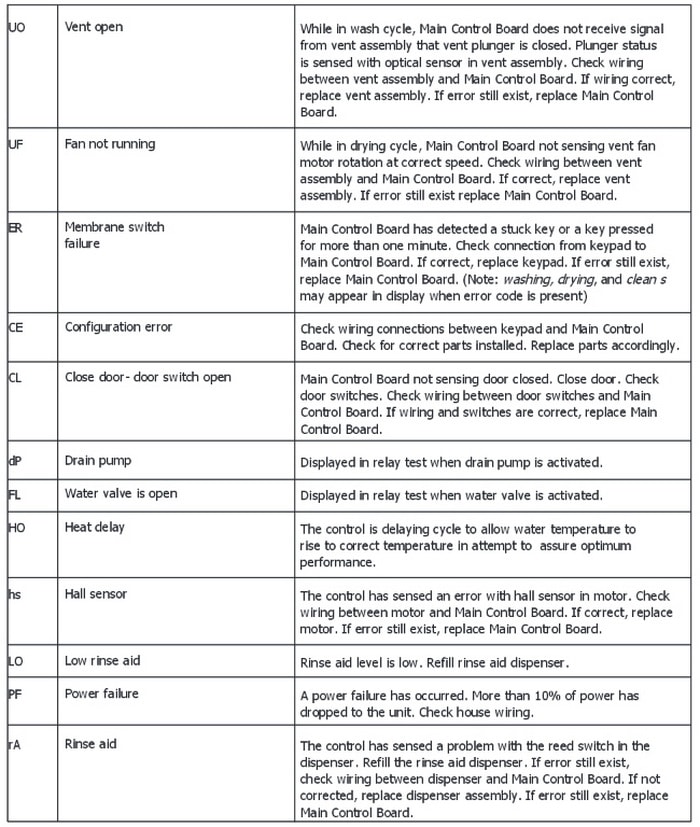
Resetting often clears error codes, but understanding what they mean helps you decide whether the fix is temporary or if hardware repair is needed.
i50: Wash Motor Issue
This code indicates a motor blockage, electrical fault, or failed component. A reset usually clears it temporarily. If it returns, you likely have a failing motor or wiring issue that requires a technician.
i60: Water Heating Fault
This means the heating element or thermostat has failed. A reset may clear it after a power cycle. If it returns, check the heating system because reset will not fix hardware damage.
iC0: Control Board Failure
This signals an electronic control malfunction. A reset often comes back if the board is damaged. Suspect a faulty control board and seek professional diagnosis.
PF: Power Failure
This code appears after a surge, outage, or voltage drop. A reset fully clears it. Use a dedicated circuit to avoid future interference.
dP: Drain Pump Error
This indicates a clog or pump failure. A reset may work if the jam is temporary. Check the drain hose and pump for debris.
i10 Through iF0: Leak or Drain Issue
These codes mean a clogged drain, stuck float switch, or kinked hose. A reset will not fix physical blockages. Clear the clog or adjust the float manually.
ER: Stuck Key
This indicates a keypad malfunction. A reset may clear it temporarily. If persistent, the keypad or control board is likely faulty.
CL: Door Not Closed
This means the door switch is misaligned or the door is not fully shut. Fix by closing the door fully and resetting. Gently push the door before starting the cycle.
When Reset Fails: Next Steps
If your dishwasher still will not start or keeps showing errors after multiple resets, the issue may be mechanical or electrical.
Check for Standing Water
Water pooling in the tub can prevent startup. Manually remove water with a towel or cup. Run a drain-only cycle if available. Inspect the drain hose for clogs or kinks. Standing water triggers safety sensors that block operation even after a reset.
Inspect the Pressure Switch
The pressure switch monitors water level and is located under the tub. It can fail and prevent filling or draining. Symptoms include the unit not starting, no water intake, or false leak errors. Replace the pressure switch (Part # A00055408) if reset fails and water issues persist.
Expert Troubleshooting Tips
Before calling a technician, try these professional-level checks to save time and money.
Find the Technical Sheet
Open the toe-kick panel at the bottom front or check inside the door jamb. Look for a white or yellow label with wiring diagrams, error codes, and model-specific reset steps. Some models require a button sequence like High Temp plus Heated Dry to enter diagnostic mode, only listed on the tech sheet.
Verify Door Closure
The dishwasher will not reset or start if the door is not fully closed. Check for food debris in the latch, misalignment, or a faulty door switch. Gently push the door shut before pressing Start.
Test on a Dedicated Circuit
Dishwashers should run on a 120V circuit with no other appliances. Shared circuits can cause voltage drops, triggering PF or CE errors. Plug another device into the same outlet to test power stability.
Run a Test Cycle
After resetting, use the Rinse Only or Quick Wash cycle. Leave it empty or load inexpensive dishes. Monitor for proper water fill, drainage at cycle end, and error code return. If the rinse cycle completes, your reset worked.
When to Call a Technician
Some issues go beyond a reset. Know when to stop DIY and call for help.
Recurring i-Series Codes
i50, i60, and iC0 returning after reset suggest motor, heater, or control board failure. These require multimeter testing and parts replacement.
ER, CE, or UF Errors Persist
ER means a stuck key or keypad fault. CE means a configuration or firmware issue. UF means the vent is open or the drying fan has a problem. All may need professional reprogramming or board replacement.
No Power After Reset
If the display stays dead after a 5-minute breaker reset, check the home electrical panel. Test outlet voltage and inspect the internal fuse if accessible. No response likely means a blown internal fuse or failed control board.
Reset Method Comparison
| Method | Time Required | Best For | Success Rate |
|---|---|---|---|
| Cancel Button Hold | Under 10 seconds | Stuck cycles, minor glitches | High |
| Start Button Hold (6 sec) | Under 10 seconds | No Cancel button models | High |
| Unplug and Wait 60 sec | About 2 minutes | Frozen display, no response | Very High |
| Breaker Off for 5 min | 5+ minutes | Recurring errors, power issues | Very High |
Always start with the Cancel button reset. If that fails, move to power-cycle, then breaker reset.
Final Checklist Before Calling for Help
Before you stop troubleshooting, run through this quick checklist.
The door is fully closed and latched with no standing water in the tub. Power is restored with the breaker on and the unit plugged in. Error codes cleared after reset. The Rinse Only cycle runs successfully. The tech sheet was consulted for model-specific steps.
If all boxes are checked and the dishwasher still fails, the issue is likely hardware-related.
Frequently Asked Questions About Resetting Frigidaire Dishwashers
How long do I hold the Cancel button to reset my Frigidaire dishwasher?
Press and hold the Cancel button for 3 to 6 seconds. On models without a dedicated Cancel button, hold the Start button for 6 seconds instead. The display should blink or turn off, indicating the reset is complete.
Does resetting my Frigidaire dishwasher void the warranty?
No. Resetting your dishwasher is safe and does not void your warranty. You can perform multiple resets without risk. The warranty only covers defects and damage from improper repairs or modifications.
Why does my Frigidaire dishwasher keep showing error codes after reset?
Recurring error codes, especially i50, i60, or iC0, indicate hardware failure. A reset may clear them temporarily, but if they return, the motor, heating element, or control board likely needs replacement. Contact a technician for diagnosis.
Can I reset my Frigidaire dishwasher by unplugging it?
Yes. Unplug the dishwasher or turn off the circuit breaker for at least 60 seconds. Some technicians recommend up to 5 minutes for stubborn faults. This allows the control board to fully discharge and reset.
What does the PF error code mean on my Frigidaire dishwasher?
PF stands for Power Failure. It appears after a power surge, outage, or voltage drop. A simple reset clears this code. To prevent future occurrences, ensure your dishwasher runs on a dedicated circuit.
When should I stop resetting and call a technician?
If two full power cycles and a button reset fail, professional service is recommended. Also stop if you see recurring i-series codes, persistent ER or CE errors, or no power at all after multiple reset attempts.
Key Takeaways for Resetting Your Frigidaire Dishwasher
Resetting your Frigidaire dishwasher is safe, simple, and the first step in troubleshooting most issues. Start with the Cancel button method, which takes less than 10 seconds and resolves minor glitches. If that fails, move to a power-cycle reset by unplugging the unit for 60 seconds. For persistent error codes, try turning off the breaker for 5 minutes to mimic a factory reset.
Understanding error codes helps you determine whether the problem is temporary or serious. Codes like PF and CL usually clear with a reset, while recurring i50, iC0, or ER codes indicate hardware failure requiring professional attention. Always check for standing water and ensure the door is fully closed before troubleshooting.
If problems persist after trying all reset methods, inspect the pressure switch or call a technician. Most dishwasher issues are fixable fast with the right steps.





