
How to Reset Miele Dishwasher: Quick Steps
Is your Miele dishwasher stuck mid-cycle, showing an error code, or completely unresponsive? These frustrating glitches happen to many owners, but the solution is often simpler than you think. A proper reset can restore full functionality in just a few minutes, saving you time and potentially costly service calls. This guide covers every major reset method for Miele dishwashers, from older G5000 units to the latest SmartLine Touch models.
You’ll learn exactly how to perform a soft reset, hard reset, and factory reset based on your specific model year. We also cover error code solutions, beep pattern decoding, and when it’s time to stop troubleshooting and call a professional. Let’s get your dishwasher back to peak performance.
Standard Power Reset for All Miele Models
The standard power reset, also called a soft reset, is your first line of defense against most electronic glitches. This method clears temporary software hiccups and works on every Miele dishwasher regardless of age or series.
Performing a Basic Power Cycle
Turn off the dishwasher using the On/Off button on the control panel. If your model lacks a dedicated power button, press and hold the Start/Stop button for three to five seconds until the display shuts down.
Wait a minimum of ninety seconds before powering back on. This pause allows internal capacitors to discharge completely and clears the control board’s temporary memory. For recurring issues, extend this wait time to five minutes.
Press the power button or Start/Stop to turn the dishwasher back on. Wait for the display to show “Ready,” the current time, or “Add Detergent” before proceeding.
Run a short test cycle such as Express 60°C or Rinse to confirm proper water intake, heating, and draining. This verifies the reset was successful.
Hard Reset by Model Year

Not all Miele dishwashers reset the same way. The correct method depends on your model’s series and manufacture year. Using the wrong procedure wastes time and may not resolve the issue.
Pre-2020 Models (G5000, G6000 Series)
Unplug the dishwasher from the wall outlet. If your unit is hardwired, switch off the circuit breaker instead.
Wait one to two minutes before reconnecting power. This ensures a complete power disconnection.
Press and hold the Start button for three to five seconds until the display activates. Begin a test cycle to confirm the reset worked.
2020–2021 Models (G7000 Series with Touch Controls)
Press and hold the Start/Stop button for three seconds. The display will flash or beep to confirm the command.
Release the button and wait ten seconds for the system to fully reboot. The display should return to the ready state.
Restart a wash cycle normally. If connected to Wi-Fi, you can also reset remotely through the Miele Home app under Device Settings, Troubleshooting, Restart Appliance.
2022 and Newer Models (G8000, SmartLine Touch)
Quickly press the Power button twice within one second. The system automatically initiates a full reset.
Wait ten to fifteen seconds for initialization to complete. The display will show the standard startup screen.
Begin a new wash cycle. This method preserves Wi-Fi settings, eco modes, and user preferences.
Factory Reset: Restore Default Settings
A factory reset erases custom programs, resets salt and rinse aid alerts, and restores all settings to their original defaults. Use this when preparing for resale or if custom settings are causing conflicts.
Universal Factory Reset for 2020+ Models
Turn off and unplug the dishwasher, or switch off the circuit breaker if hardwired.
Wait one to two minutes before reconnecting power.
Within ten seconds of restoring power, press and hold both the Start and On/Off buttons simultaneously. Hold for five to ten seconds until lights flash or a beep sounds.
The display resets to default language and time settings. Run a short cycle to confirm the reset was successful.
This process erases custom programs, child lock status, and preferred settings. Wi-Fi credentials are preserved on newer models.
Fix Common Error Codes with a Reset
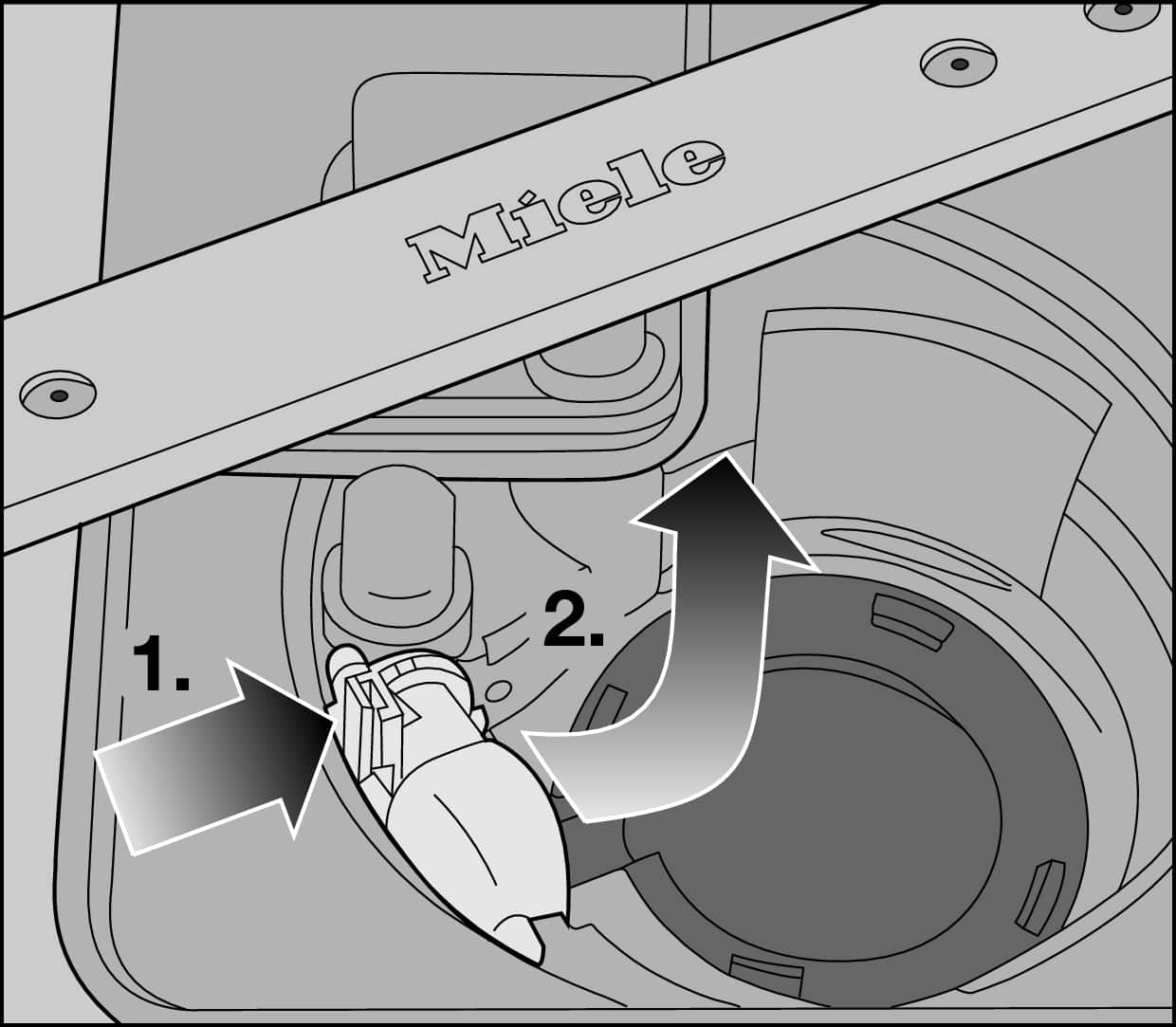
Some error codes disappear after a proper reset if the cause was temporary rather than mechanical. Here’s how to handle the most frequent codes.
F1: Water Intake Failure
A reset may fix this if caused by momentary low water pressure or a clogged inlet screen. After resetting, check that the water supply valve is fully open. Clean the inlet hose filter screen and verify water pressure is between twenty and one hundred PSI.
F2 or F14: Drainage Issues
Reset can clear these if the blockage was manually cleared beforehand. After resetting, clean the drain filter thoroughly. Inspect the drain hose for kinks and verify the loop height is sixty to eighty centimeters. Ensure the pump impeller spins freely.
F3: Overfill Protection
Sometimes triggered by a sensor glitch rather than actual overfill. After resetting, inspect the float switch and pressure sensor. Clear any debris from the sump area.
F4, F5, F6: Heating, Sensor, or Motor Faults
These indicate hardware failures and will not resolve with a reset. Contact a certified Miele technician if these codes return after resetting.
Decode Beep Patterns and Blinking Lights
Your Miele dishwasher uses sound and light to communicate issues. Understanding these signals helps you respond correctly.
Common Beep Patterns
A single beep usually means the door isn’t fully closed. Close the door firmly and ensure the latch engages. Repeated short beeps indicate an obstruction check the racks, spray arms, and utensils for blockages. A continuous tone suggests an internal fault perform a hard reset. If it persists, call service. Three beeps at startup mean the cycle was denied due to an open door or lock fault.
Flashing Display or Lights
Flashing lights indicate an interrupted cycle, active error state, or communication failure between modules. Cancel the cycle using Start/Stop, then power off for two minutes. Hold Start/Stop until the red light blinks, then restart with a short cycle. Persistent blinking after these steps suggests a control board, door lock, or water sensor issue requiring professional attention.
Clear LI Error: Drain Line Blockage
The LI error, meaning “Leitung ist verstopft,” signals a drain line blockage. This is one of the most common issues Miele dishwasher owners face.
Step-by-Step Fix
Cancel the current cycle and remove the lower rack. Twist and lift out the drain filter, then disassemble and rinse it under hot water. Use a soft brush to remove grease buildup.
Inspect the sump area and manually rotate the pump impeller to clear any debris. Check the drain hose for kinks, proper loop height, or connection to a clogged garbage disposal.
After cleaning, unplug the dishwasher or switch off the breaker. Wait five minutes before restoring power. Run a Rinse or Drain Only cycle to confirm proper drainage.
Unlock Door After Mid-Cycle Cancel
For safety, Miele dishwashers lock the door when water temperature exceeds fifty degrees Celsius. This prevents burns during active cycles.
Safe Unlock Procedure
Cancel the cycle through the control panel. Wait one to two minutes for the water to cool slightly, then try opening the door gently.
If still locked, manually drain standing water through the filter access point using towels or a small container. Allow up to thirty minutes for complete cooling before attempting to open again.
If the door won’t open and no water is present inside, the door lock solenoid has likely failed. Contact a technician for replacement.
How Long to Power Off for Effective Reset
Timing matters when resetting your Miele dishwasher. Longer off periods increase the success rate for stubborn issues.
| Issue Type | Recommended Off Time | Why It Works |
|---|---|---|
| Frozen display | 90 seconds to 2 minutes | Clears RAM and cache |
| Recurring errors | 5 minutes | Ensures full capacitor discharge |
| Software lockup | 10 minutes | Maximizes system reset depth |
| After power surge | 10+ minutes | Prevents residual current damage |
For best results across most issues, wait five minutes during the power-off phase.
What Resets Cannot Fix
A reset clears software glitches but cannot repair mechanical or plumbing problems. Understanding these limitations prevents wasted time and potential damage.
Issues That Require Professional Service
Failed heating elements cause no hot water and require replacement. Broken drain pumps leave water in the tub even after cleaning. Cracked tubs or leaking hoses need immediate attention. Clogged inlet valves cause F1 errors to return immediately after reset. Firmware corruption may require a dealer update rather than a user reset.
If your dishwasher shows no power, leaks water, or trips the breaker, stop resetting immediately and call a professional.
When to Call a Technician
Stop DIY troubleshooting and contact a certified Miele technician if you experience multiple failed resets, error codes that return immediately, no power to the control panel, water pooling under the unit, grinding or screeching noises, repeated door lock failures, or the unit trips the breaker on startup.
Certified technicians have access to proprietary diagnostics, firmware updates, OEM parts, and calibration tools that aren’t available to consumers.
Final Thoughts on Resetting Your Miele Dishwasher
Resetting your Miele dishwasher is often the fastest way to resolve electronic glitches, error codes, and unresponsive controls. The key is matching the reset method to your model year, waiting the proper duration during the power-off phase, and verifying the fix with a test cycle. Remember that resets fix software issues, not mechanical failures. If the same problem returns after a successful reset, the underlying cause is likely hardware-related and requires professional attention.
For long-term reliability, perform monthly maintenance including cleaning the filter, inspecting spray arms, and checking salt and rinse aid levels. Locate your model number before attempting any reset, and keep your Miele Home app updated for remote diagnostics. With proper care, your Miele dishwasher will deliver spotless results for years to come.
Frequently Asked Questions About Resetting Miele Dishwashers
How do I reset my Miele dishwasher without unplugging it?
For most models, press and hold the Start/Stop button for three to five seconds until the display powers down. Wait ninety seconds, then press the button again to restart. Newer 2022+ models respond to a quick double-press of the Power button.
Why won’t my Mielle dishwasher start after a power outage?
Perform a standard power reset first. Unplug the unit or switch off the breaker, wait five minutes, then restore power. If the display remains dark, check your circuit breaker and GFCI outlets before calling service.
Does resetting my Miele dishwasher void the warranty?
No. Performing user-level resets through the control panel or power cycle does not void your warranty. Only opening sealed compartments or attempting internal repairs may affect warranty coverage.
How often can I reset my dishwasher without causing damage?
Occasional resets are safe, but excessive resetting stresses control board capacitors and relay components. If you find yourself resetting more than once a month, investigate the underlying cause rather than relying on resets as a permanent solution.
Will a factory reset delete my Wi-Fi settings?
On 2020 and newer models, a factory reset using the Start and On/Off buttons preserves your Wi-Fi credentials. However, custom programs, preferred settings, and salt or rinse aid reminders will reset to defaults.





